Technology spending · A tool walkthrough
What happens after the cost report?
You can explain a software bill perfectly and still miss the date to change the contract. The numbers were there. They just didn’t reach the decision in time.
I built Signal Audit to help find that gap. You answer 12 questions about one part of a business and get a suggested first step, who to involve, and what to check. It works through the answers you choose; it doesn’t inspect your accounts or verify the business behind them.
Try the free auditPick a scope you can actually answer for.
Choose one team, product, application, or business unit, then the technology spending involved. That might be software subscriptions, cloud infrastructure, AI usage, or a mix. Keep that scope in mind for every question.
Answer for what happens today. If you don’t know, choose I don’t know or can’t see this information. If a question genuinely doesn’t apply, choose This doesn’t apply to the scope I chose. Neither is scored as zero, and the result keeps them separate.
This is for reviewing business technology spending. It isn’t a personal budget tool. You also don’t need a formal finance department or separate people for every role; the person approving a purchase may be you.
Try a software renewal example with me.
Open Signal Audit and choose Try a made-up example. It shows a team that can explain its bills, but reviews renewals late and doesn’t consistently record who will follow up. If you edit the answers, the label changes to “Started from the made-up example, then edited” and the original scenario description disappears. Choose Start fresh for your own situation.
The illustrative result
Visible, Not Embedded: 78/100 points for understanding the spending and 28/100 for using it in decisions. Eleven questions are scored. The usage based billing question is marked not applicable.
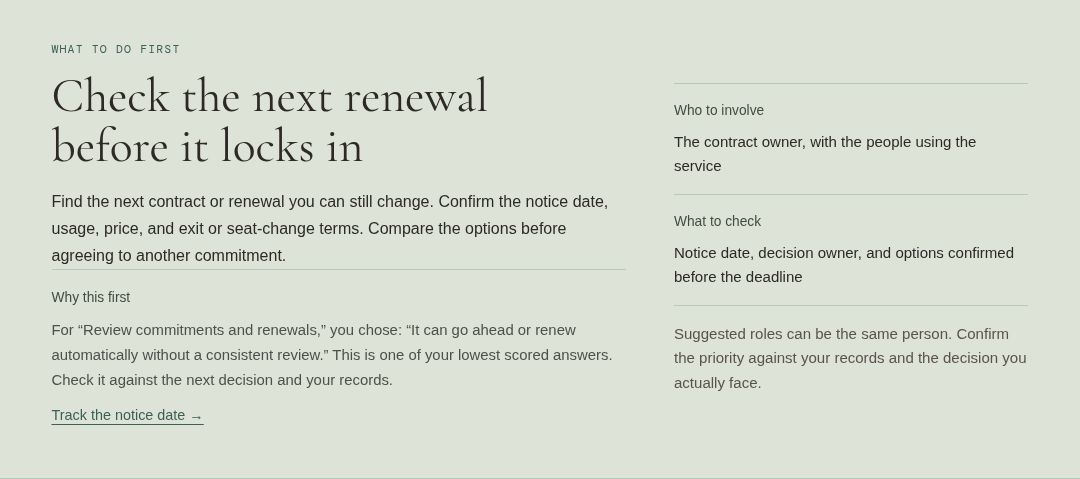
The first step is Check the next renewal before it locks in. The team said a contract can renew automatically without a consistent review. That answer gives the suggestion a clear starting point.

What do I do with that?
I’d start by finding the next contract the team can still change. Check the notice date, current usage, new price, and the terms for reducing seats or leaving. Then find the person who can make the decision and agree when they’ll respond.
The useful result is a renewal with a known deadline, an owner, and options you can still choose between. A calendar reminder might be enough to help a small team. A bigger process only makes sense if the problem needs it.
Read Why this first to see which answer drove the suggestion. Then check the four areas and Review your 12 answers. If you chose an answer you can’t support with a recent example or record, edit it. If another issue is more urgent, use your judgment and handle that first.
The scores need a little context.
The first two numbers are points on our own 0–100 scale. They aren’t percentages of savings, probabilities, or your position against other businesses. The scored-answer count tells you how many responses went into the calculation. It doesn’t measure whether those answers are true.
Each answer is worth 0–3 points. An area needs at least two scored answers from its three questions. We normalize each area to 100 and round it; the map’s two axes average their paired area scores and round again. The dividing lines and pattern labels use the same 67 point cutoff. The full method and tie rules are available beneath your result.
A known low answer still gets a suggested step even if there aren’t enough answers for the map. The lowest individual answer comes first, so a better area average can’t hide it. If your lowest answer is 2, the suggestion is a check to consider if that partial practice affects your next decision. Keep it if it meets your needs. You don’t need more process just to chase a higher score.
With no answer below 3, the tool asks about any missing information or checks whether the scope fits. If there is enough information and every scored answer is 3, it suggests maintaining what’s working. Exclusions never become a low score or an invented map position.
Keep the same scope, people, and exclusions in mind before comparing two results. A higher score after changing the scope or excluding a difficult question doesn’t establish an improvement.
Keep something you can bring to the review.
Copy summary includes the date taken, rubric version, scope, result, next step, discussion questions, and all 12 answers. The date and rubric version also appear on the printable result. Paste it into your notes so the next person can see what went into the suggestion. If automatic copying isn’t available, the tool shows the full summary in a text box you can select and copy. Print / Save PDF opens your browser’s print dialog.
Edit answers keeps your choices so you can correct them. Going back to change the scope clears the earlier answers, because they may describe a different situation. Start fresh clears the result and selections.
The questionnaire calculates in this browser tab. It doesn’t send answers to an AI provider or save them for another visit. Refreshing or leaving can lose your work, so copy or print first. Basic site analytics record tool activity without your answers or scores.
A starting point, with limits.
The result is based on your own description of the process. It won’t tell you whether a bill is accurate, a forecast is reliable, or a saving will happen. Check the relevant bills, usage, terms, and decisions with the people involved.
The concepts draw on the FinOps Foundation’s Framework, Maturity Model, and Assessment Guide, adapted under CC BY 4.0. Cloud & Capital’s 12 questions, scoring, and suggested steps are an independent adaptation, not the Foundation’s assessment or an endorsed certification. The rubric has not been calibrated against an industry dataset.