Technology decisions · A tool walkthrough
A higher renewal quote. Now what?
The software is getting more expensive. Some seats sit unused. Switching might help, but you haven’t checked what that would involve. Where do you start?
I built Interactive Lab to help you work through a technology spending decision. You bring the question and a little context. It puts your options, the missing information, and a suggested next move into a short brief.
Open the free LabTry the renewal example with me.
Open the Lab and choose Software renewal under Try a made-up example. It fills in the decision and the four follow-up answers so you can see how the tool works.
The made-up situation
Your design software renews in 30 days. You pay $2,880 a year for 12 seats, and the new quote is 20% higher. Ten seats are used every week; two are unused. You could renew everything, reduce seats, negotiate, or switch.
You need to keep access to existing design files and comments. You haven’t confirmed the price of a smaller plan, the replacement cost, migration effort, or the next contract term.
Read the filled-in details, then choose Generate the brief. Give it a moment to finish. The answer is generated each time, so your wording may differ from the screenshot.

What do I do with the answer?
Start with Recommendation and Next actions. For this example, I’d ask the vendor for a better quote and written pricing for the seats the team uses. I’d also check what happens to shared files and comments before removing anyone’s access.
Read the Before you renew checklist first. Does the plan auto-renew? How much notice do you need to cancel or change seats? The date to act can be earlier than the renewal itself. Check those terms before assuming you still have the full 30 days.
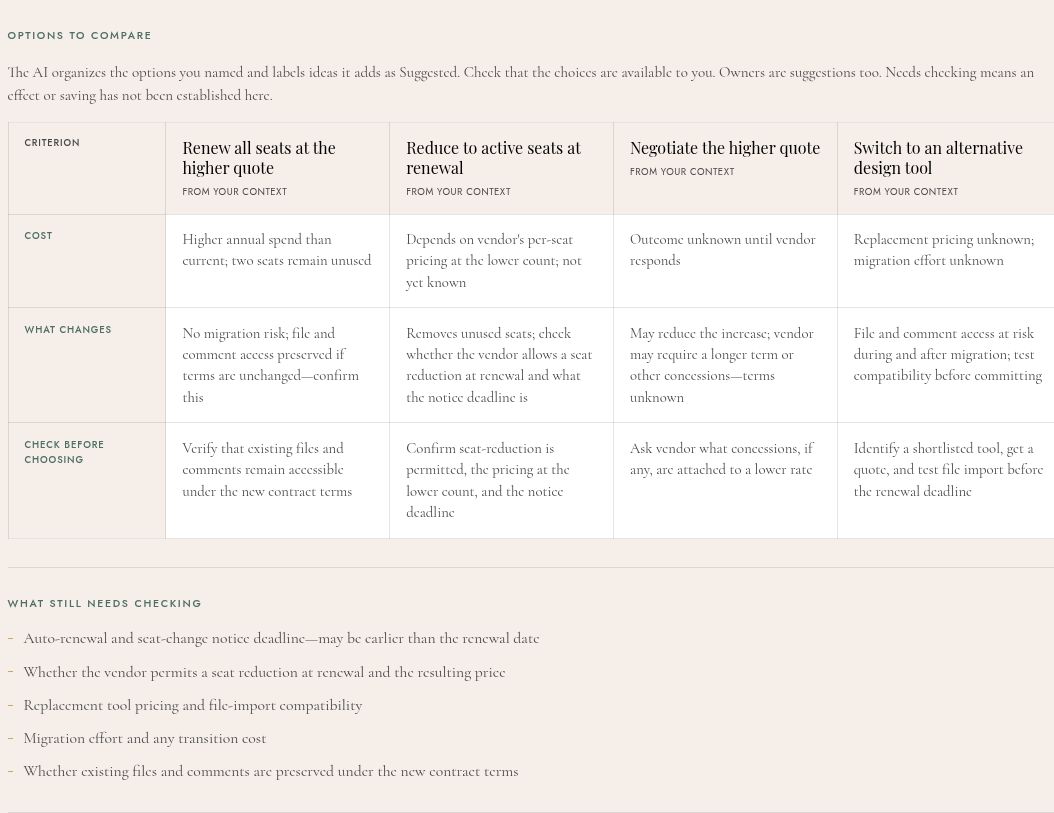
Then read Options to compare. Fewer seats might mean a lower bill, but only if the vendor’s pricing allows it. Switching is still worth checking; unknown migration effort doesn’t automatically rule it out.
Ideas the AI adds are labeled Suggested. The other options are based on your context. Check that they reflect the choices you actually have. Action owners are suggestions too; a role in the brief doesn’t mean your team already has someone doing that job.
Needs checking means an effect or saving hasn’t been established here. The Lab leaves that as something to confirm rather than promising a result.
That gives you something to do: get the missing prices and terms, check the impact on the team, and come back to the decision with better information. The brief can help you prepare for that conversation.
Now bring your own question.
Choose Try another to start fresh. If you’re halfway through an example, go Back and choose Reset. Editing only part of an example keeps its illustrative label, so you don’t accidentally treat made-up details as your own.
- Describe the decision. Say what you’re choosing between and why it matters. “Our software renews next month and the price is going up” gives the Lab more to work with than “help with software.” Then choose Next: add details.
- Answer the four follow-up questions. They change with the type of decision. For a renewal, you’ll cover the options, costs and deadline, usage and ownership, and what makes a change difficult.
- Say what you don’t know. “We haven’t checked the cancellation terms yet” is a useful answer. Fill in every field with a short explanation; you don’t have to invent a figure to continue.
- Generate, read, and check. Use the proposed actions to decide what to investigate. Open Context supplied to check what went into the brief, or choose Edit context when you have more information.
Going Back keeps your answers for the same kind of decision. If you change a figure or date in the question, update it in the answers too. The Lab reminds you to check, but doesn’t automatically rewrite your answers. If you change to a different kind of decision, such as moving from a renewal to an AI build-or-buy question, you’ll need to answer the relevant questions for that choice.
A confident answer still needs checking.
The brief may say Gather more information, Compare before committing, or Ready to choose. These describe its suggested approach. The confidence label is the AI’s assessment of the context you supplied, not a measured probability that the recommendation is right.
Run the same example again and the wording or confidence label can change. Read the reasons and missing information rather than treating the label as a score.
The Lab doesn’t connect to your accounts, inspect a contract, or fetch current vendor prices. It can misunderstand your situation or make a claim that goes beyond the details you gave it. Check prices, terms, access, and operational effects with the people and records involved before acting.
You won’t always see a calculation section. It appears only for supported calculations with a clear basis, such as this price increase. It isn’t a full savings estimate or financial forecast.
Keep the brief before you leave.
Copy decision brief puts the result, original question, and all four answers on your clipboard. Paste it into your notes or share it with the person helping you decide. Print / Save PDF opens your browser’s print dialog, where you can choose a PDF destination. The print version includes that context too.
Edit context opens your answers. Use View last brief to return to the previous result while you’re editing. Generating again replaces it, so copy it first if you want to compare versions.
Your work isn’t automatically saved for another visit. Refreshing or leaving the page can lose it. If generation fails or you choose Cancel, your answers stay on the page so you can edit or try again.
Your entries are sent to an AI model to generate the brief. Leave out confidential contract terms, customer data, passwords, and sensitive infrastructure details. You can describe the situation using anonymous names and rounded amounts.